SIS Facts: What FACTS Student Information System Does Best
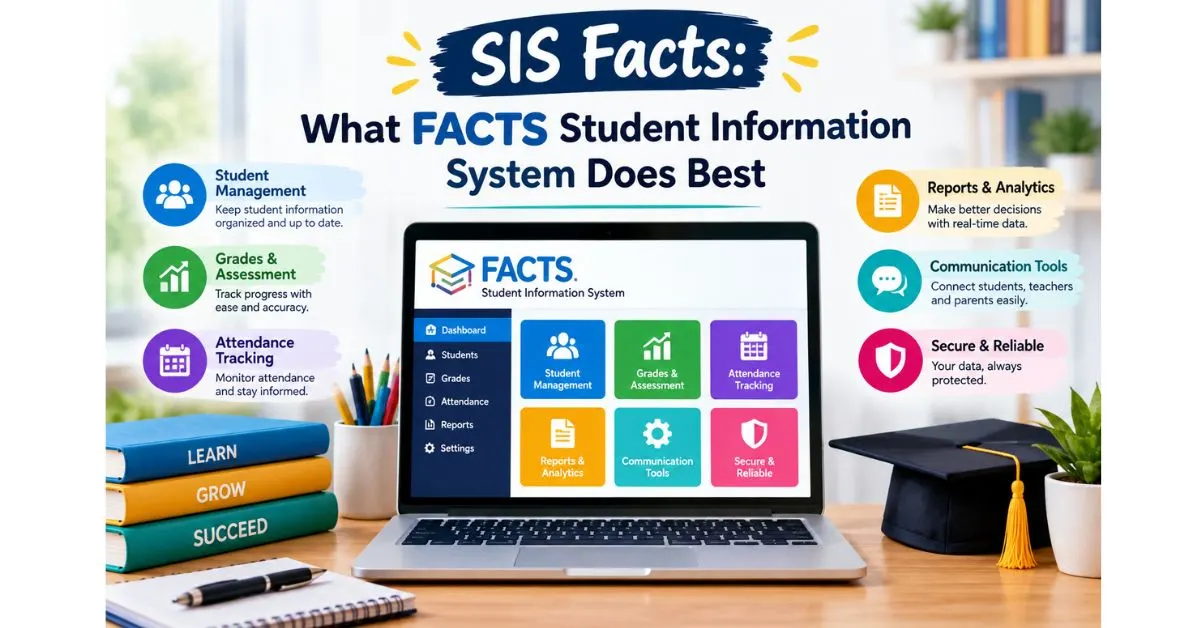
SIS facts come down to this FACTS SIS is a K-12 student information system that keeps admissions, attendance, gradebooks, report cards, and family communication in one secure place. If you have juggled spreadsheets, paper folders, and scattered emails, that single source of truth feels like relief.
I reviewed current G2 and TrustRadius feedback and the official FACTS pages so you do not have to dig. You will see what administrators, teachers, and parents actually get from the parent portal, where reviewers get frustrated, and which tuition management and enrollment tools deserve scrutiny.
SIS Facts: What Is FACTS Student Information System?
FACTS Student Information System, formerly known as RenWeb, is cloud-based school management software built for private and independent K-12 schools. It handles admissions, student records, billing, attendance, grading, and parent access, and TrustRadius lists it as a property of Nelnet Business Solutions.
Here is the naming answer many people search for: FACTS is the company, and SIS stands for Student Information System. More than 12,000 schools use the platform and FACTS cites over 35 years in education, which helps explain why its tools feel so widely adopted.
| SIS Facts at a Glance | Detail |
| Former name | RenWeb |
| Owner | Nelnet Business Solutions |
| Schools served | 12,000+ (per G2 listing) |
| G2 rating | 4.1 / 5 from 120 reviews |
| TrustRadius score | 7.5 / 10 from 30 reviews |
| Pricing | On request (not published) |
| Language support | One-click Spanish translation for families |
Use Cases and Deployment Scope
Reviewers describe everyday scenarios. One small K-12 school supports roughly 750 to 800 families, using FACTS for demographics, scheduling, class rosters, billing, and custom reports. Another stores medical details, authorized pick-up contacts, grades, and report cards, showing the system adapts from small campuses to busier mid-sized schools.
SIS Facts on Top Performing Features
TrustRadius reviewers rate district communications, roster management, and student data security among the platform’s strongest areas. Alerts, announcements, and direct messaging connect faculty with parents, while role-based permissions protect sensitive records. For privacy-conscious schools, that security strength matters as much as any flashy dashboard.
G2 adds a longer list: attendance, cafeteria management, health records, behavior tracking, standards-based grading, transcripts, and customizable report cards. It also highlights a mobile-responsive design and one-click Spanish translation, which help multilingual families follow grades and school announcements from any phone.
Most Important Features
When reviewers name what they rely on daily, one short list keeps appearing gradebook, attendance taking, student information, and report card distribution. Billing and enrollment management also surface often, especially for schools that pair the student records system with FACTS tuition and application tools.
SIS Facts: Benefits to Administrators
For administrators, the appeal is control without chaos. Security groups decide which staff members see which program areas, while prebuilt and custom reports cover rosters, transcripts, course listings, and year or term summaries. Headmasters, admissions directors, and office assistants all work in one system with different permissions.
Automation helps too. Staff can send email, schedule attendance notifications, and review complete email history. One reviewer said their school once tracked everything across multiple spreadsheets and websites. Now each record is updated once, which improved accuracy and cut hours of repeated data entry.
Student Dashboard
The student dashboard gives administrators at-a-glance access to academics, alerts, behavior, contact information, demographics, finance, schedules, and transcripts. Many fields can be edited right there, so a registrar answering a parent’s call does not bounce between screens hunting for one missing address.
Family Dashboard
The family dashboard shows demographic and relationship details in one view. That matters for non-traditional households, although some reviewers admit divorced parents or custodial grandparents required extra setup. Clean family records mean the right guardian receives the right grade report, billing notice, and emergency alert.
Administrator Tools
Administrator tools cover mass email, automated attendance messages, student data views, and customized reports. A school IT director on G2 praised auto-emails for absences and tardies, noting staff no longer phone families one by one, which frees front-office time for tasks that genuinely need a human voice.
SIS Facts: Benefits to Teachers
Teachers care about minutes. FACTS SIS lets them take attendance by name or seating chart, mark lunch orders simultaneously, and enter assignments and grades without switching systems. Announcements, calendar events, homework drop, and syllabi sync automatically to the family portal, so parents see updates without extra emails.
One teacher called the fill button a lifesaver for grade entry, and another valued messaging parents without using a personal phone. Still, several educators found report generation confusing, so expect a short learning curve before daily tasks feel automatic and before report building feels natural.
SIS Gradebook
The gradebook supports standards-based grading when configured, plus straightforward assignment entry. Teachers can track missing work, calculate overall grades automatically, and enter skill-set or citizenship marks and comments for report cards. A science teacher on G2 said it keeps grade records organized and timely all semester long.
Lesson Plans
Lesson planning is built to repeat. Teachers create plans, copy them, and save master versions for reuse year after year. Because plans can sync to the family portal, parents also gain visibility into daily and weekly classroom topics without waiting for a newsletter or an end-of-week email from the teacher.
Multi-device Support
Responsive design means teachers can open the system on desktops, laptops, tablets, and phones. Reviewers do note the mobile app lacks some desktop features, especially grading and messaging, so schools with teachers who work between classrooms should test mobile workflows during a demo before signing anything.
SIS Facts: Benefits to Families
Parents mostly want clarity. Through the FACTS Family Portal, they see grades, assignments, attendance, calendars, and announcements without chasing teachers. Schools that pair SIS with application, enrollment, and tuition tools also let families apply, enroll, and manage payment plans from one login instead of juggling three separate websites.
A reviewer who left a clunkier system said parents had a much easier time afterward, and another loved that families can pull up assignments and newsletters instantly. That transparency builds stronger school-home partnerships, which is often the quiet reason schools stay with the platform for a decade or longer.
Family Portal
The FACTS Family Portal keeps families informed about grades, assignments, attendance, and calendars, with information configured to each school’s specifications. Because teacher updates sync automatically, parents rarely wonder whether homework was posted. Schools control what appears, which keeps grade visibility consistent with their own policies and communication habits.
Easy Communication
Communication tools send email, text, or push notifications when paired with FACTS Parent Alert and the Family Custom App. One school praised the ability to message an entire campus, one grade level, or a single classroom. Another reviewer wished text alerts could be sent directly from a phone during emergencies.
Devices Supported
FACTS says the family experience works across all devices and browsers, and G2 describes the system as mobile-responsive. That means a parent can check a report card from a phone in the pickup line. One reviewer did report report cards displaying poorly on iPhones, so confirm current behavior during onboarding.
SIS Facts: Pros & Cons
On G2, FACTS SIS holds a 4.1 out of 5 rating from 120 reviews. Users most often praise customer support (32 reviews), ease of use (22), the user-friendly interface 21, and centralized information (17). Reporting and comprehensive features also earn repeated praise from administrators and teachers alike.
Complaints cluster around learning difficulty (14 reviews), poor usability for first-timers (11), technical issues such as loading errors (7), confusing reporting (6), integration headaches (5), and extra module costs (4). Many G2 reviews were invited and lightly incentivized, so read praise with healthy skepticism and ask for references.
| What users like (G2 review count) | What users dislike (G2 review count) |
| Customer support (32) | Learning difficulty (14) |
| Ease of use (22) | Poor usability for new users (11) |
| User-friendly interface (21) | Technical issues, loading errors (7) |
| Centralized information (17) | Confusing reporting (6) |
| Ease of access to records (17) | Integration issues (5) |
| Great reporting (11) | High cost of extra modules (4) |
SIS Facts: Areas for Improvement
TrustRadius reviewers flag the teacher and parent mobile app, third-party edtech integrations, and platform customization as areas to improve. G2 reviewers echo this, describing a dated interface that needs several clicks for basic tasks, and one wished for smoother Google Classroom and Microsoft Teams compatibility.
Other friction points include slow mornings when everyone takes attendance, occasional error codes, and email formatting that is not fully responsive. One reviewer said sent messages are not logged, yet FACTS describes a complete email history, so ask your representative to demonstrate exactly how message records appear.
SIS Facts: Return on Investment
TrustRadius reviewers describe measurable payoffs. One school said the system paid for itself many times over, while another stopped managing bank and card details for 400 families because parents handle payments through their own portal. Emergency text alerts and continuous software updates also appear in their ROI notes.
The catch is cost clarity. FACTS does not publish pricing, and G2 reviewers mention that extra modules or custom report requests can add fees outside the original budget. Get a written quote covering every module you expect to use, including tuition management, enrollment, and communication add-ons, before comparing total cost.
SIS Facts: Top FACTS SIS Alternatives
G2 lists PowerSchool SIS (4.2 from 722 reviews), Gradelink (4.7 from 225 reviews), and Skyward Student Information System (3.8 from 177 reviews) among top alternatives. TrustRadius reviewers also mention Blackbaud Education Management Solutions. Compare them on reporting, mobile experience, integrations, and total cost rather than headline ratings alone.
The most useful SIS facts are practical FACTS shines for all-in-one admissions, billing, grades, and parent communication, and reviewers praise its support team, yet it demands patience with a learning curve and a dated interface. Book a demo, test real workflows, and ask peer schools for candid feedback.
| Platform | G2 rating | G2 reviews |
| FACTS SIS | 4.1 / 5 | 120 |
| PowerSchool SIS | 4.2 / 5 | 722 |
| Gradelink | 4.7 / 5 | 225 |
| Skyward Student Information System | 3.8 / 5 | 177 |
FAQs
What does FACTS SIS stand for?
FACTS is the name of the company, and SIS stands for Student Information System. Together, FACTS SIS is the company’s K-12 school management platform covering admissions, attendance, grading, report cards, communication, and family access.
What is FACTS SIS used for?
The core SIS facts: schools use FACTS SIS to store student and family records, take attendance, enter grades, print report cards, track behavior and health information, and message parents. It also connects with FACTS tuition management and application and enrollment products for billing and admissions.
Is FACTS SIS the same as RenWeb?
Yes. FACTS Student Information System was formerly known as RenWeb. Reviewers who have used it for 10 to 15 years still refer to the product by its old name, but the current branding is FACTS SIS.
How much does FACTS SIS cost?
Among the SIS facts buyers want most, FACTS does not publish pricing. Listings on G2 and Techjockey show price on request, so schools need a custom quote. Ask about every module you plan to use, since reviewers mention extra costs for additional features and custom reports.
What are the biggest complaints about FACTS SIS?
Reviewers most often cite a learning curve, clunky navigation for first-time users, occasional loading errors, confusing report building, and integration challenges with unusual family structures. Many also say customer support is responsive and helps them work through these issues.
Does FACTS SIS have a mobile app?
Yes. FACTS offers a mobile experience and a responsive web design, and families can use the Family Portal on phones. Reviewers say the app is useful for quick updates but lacks some desktop features, particularly for grading, messaging, and attendance, so test it during a demo.
Does FACTS SIS work with Google Classroom?
FACTS lists Google Classroom integration among its features and says it syncs courses, grades, and classroom information with integration partners. Some reviewers still want smoother compatibility with Google Classroom and Microsoft Teams, so confirm exactly which data syncs and how often with your representative.

Hi, I’m Benjamin, the person behind FactsAboutDog.com. 🐶
I’m passionate about dogs and love sharing interesting, fun, and educational facts about our furry friends. Through FactsAboutDog.com, I aim to make learning about dogs simple, enjoyable, and informative for dog lovers everywhere.
From amazing dog facts to breed information and fascinating animal knowledge, my goal is to help readers discover something new every day.
Explore the world of dogs with Benjamin at FactsAboutDog.com!